

First, work out how you signed up
Sign in with Google. Make sure your browser is signed in to that same Google account, then use the Sign in with Google button. If you use several Google accounts, a private or incognito window avoids picking up the wrong one.
Email and password. Use the password reset link on the login page. The email arrives within a few minutes. Check your spam folder.
Sprizzy never sets a password for you and never sends one by email. Nobody at Sprizzy will ever ask you for your password.
I paid but I do not see my campaign
This is almost always two accounts. It is easy to sign up twice, for example once with a password and once with Google.
Open your payment receipt email from Sprizzy. It shows the email address of the account the payment belongs to. Log in with that address and your campaign will be there. If you paid with PayPal, the transaction details show it too.
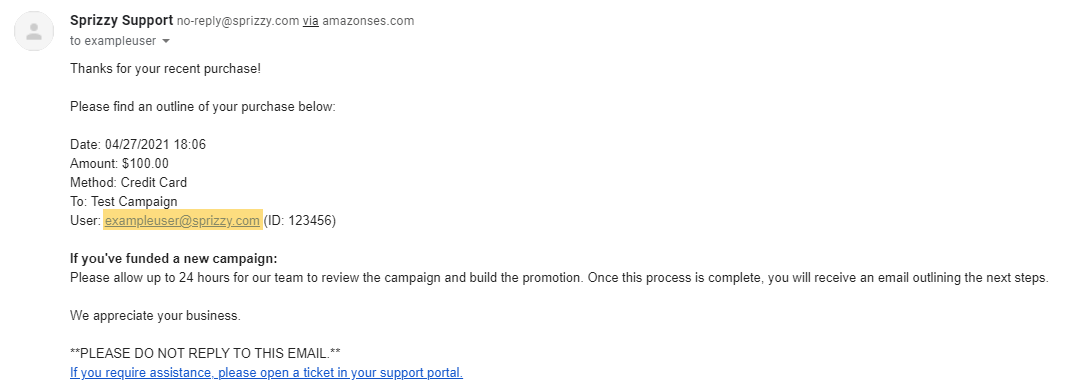

Campaigns and funds cannot be moved between accounts. Money in an account can be spent or refunded from that account.
“User was removed”
That message means the account was closed. If you want it back, email support@sprizzy.com from the address on the account and ask about restoring it.
Account suspended or restricted
Email support@sprizzy.com from the address on the account. The team that reviews account restrictions will look at it and reply.
Changing the email address on your account
For security, login email changes are always handled by a person. Email support@sprizzy.com from the address currently on the account, and say which address you want to use.
What to do next
Try the reset link or the Google sign-in first. If you are still locked out, email support@sprizzy.com and include the email addresses you may have used.