
What Auto-Promote does
Auto-Promote watches a channel you choose. Each time you publish a new video, it creates a promotion for that video using the settings you saved, and charges the card on file for the budget you set.
It is a convenience feature, not a subscription. Each charge is a promotion, at the same price as a promotion you create yourself.
Looking for the done-for-you monthly plan instead? Grow my channel renews each month until you cancel, and we email each month’s plan 3 days before it renews, so you can change, skip or cancel.
Why you might see a charge you did not expect
If you see charges from Sprizzy but did not create a promotion, Auto-Promote is the usual explanation. It charges when the promotion is created, which is shortly after you upload.
You get an email every time it creates a promotion, and an email if a payment is declined. An “Auto-Promotion Failed” email means the payment did not go through and you were not charged.
How to turn it off
- Open Auto-Promote New Videos in your account menu.
- Click the name of the channel.
- Click Disable Auto-Promote.
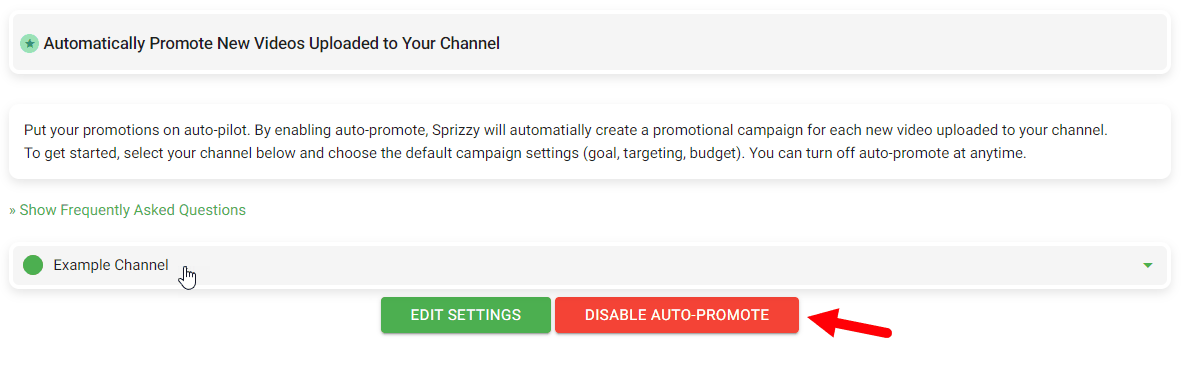
Do this for every channel listed. Once it is off, no new promotions are created.
How to skip a single video
Every “campaign created” email has a cancel link. Use it before the promotion starts delivering and the promotion ends, with everything it has not spent going to your Sprizzy account balance. You can spend that balance on another promotion, or send it back to your card from your Payment History page.
Once the promotion has started getting views, the cancel link no longer ends it. End the promotion from your account instead: open Campaigns, end that promotion, and the unspent part goes to your account balance, which you can refund from Payment History.
Getting money back
- Money still sitting in an auto-created promotion: end the promotion and choose End Campaign & Refund Payment, or put it in your account balance and refund it from Payment History.
- Money already spent on delivered views: email support@sprizzy.com with the promotion IDs and what happened, and a person will review it.
Good to know
- Only videos published after you switch Auto-Promote on are promoted. It does not go back through your old uploads.
- New uploads are usually picked up within about an hour.
- You can choose to promote all new videos, or only videos you add to a specific playlist.
- The minimum budget is the same as for a normal promotion.
What to do next
Open Auto-Promote New Videos and check which channels are active. Then open Payment History to see exactly what was charged.
Is Sprizzy a Subscription? Auto-Promote Explained
Read the video transcript
Sprizzy isn't a subscription. You pay for each promotion once, at the budget you choose.
Sprizzy has no monthly fees and no contracts. You can pause or end a promotion at any time, and there's nothing else to cancel.
Sprizzy Auto-Promote is an optional autopilot for growth. Switch it on for a channel, and every new video you upload gets its own promotion, with no manual setup.
Each promotion uses the settings and budget you saved, at the same price as one you create yourself. It's a convenience feature, not a subscription. You can promote every new video, or only the ones you add to a playlist, and it never goes back through your old uploads.
Sprizzy Auto-Promote charges once for each new upload it promotes, and every charge matches a line in your Payment History, with the date, the amount and the promotion it paid for.
Sprizzy keeps you in control: Auto-Promote turns off in three steps. Open Auto-Promote New Videos in your account menu, click the channel's name, then click Disable Auto-Promote. Once it's off, no new promotions are created.
Sprizzy emails you every time Auto-Promote creates a promotion, so you can skip any single video. Use the cancel link in that email before the promotion starts, and everything it hasn't spent goes to your account balance, for another promotion or back to your card.
Get the full answer at sprizzy.com. Next up: how much does Sprizzy cost?