

Sprizzy shows more subscribers than my video’s analytics
Subscribers your campaign brings in are credited by YouTube to wherever the Subscribe button was tapped. For in-stream ads that is usually your channel page. For in-feed ads it is usually right where the ad was watched, in the feed or in search results. Either way, YouTube Studio’s panel for the promoted video only counts subscriptions made on that video’s own page, so most of your campaign’s subscribers do not appear there.
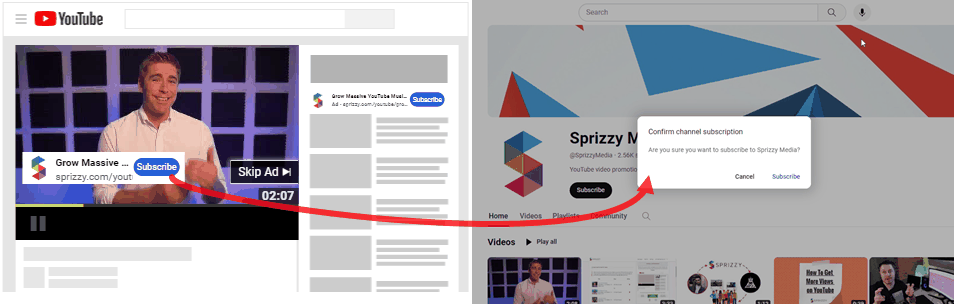
The better comparison is your channel’s overall subscriber growth for the campaign dates, in YouTube Studio.
Two campaigns running at once inflate the total
If you run two campaigns for the same channel at the same time, each one reports your channel’s growth for the overlapping days. Adding the two together double counts those days.
If exact per campaign numbers matter to you, run campaigns one after another, or link your channel so Google Ads attributes subscribers to the right campaign. See Link your channel to Google Ads.
YouTube rounds subscriber counts
Once a channel passes 1,000 subscribers, YouTube only updates the displayed count in steps. Between 1,000 and 9,999 subscribers it moves in tens, between 10,000 and 99,999 it moves in hundreds, and so on. Your count can sit still for a while and then jump.
Your own YouTube Studio analytics show the exact number.
My subscribers, views or likes went down
YouTube reviews engagement across the whole platform and removes what it does not count as genuine: views it decides are invalid, accounts that have been closed, and spam accounts. People also unsubscribe and unlike on their own.
This happens to every channel, and it is not caused by your campaign. Views that came from your ad are reported by YouTube’s own ad platform, so they are the least likely to be affected.
If your YouTube advertising traffic in YouTube Studio actually dropped for the campaign dates, that is worth looking at. Email support@sprizzy.com with the campaign ID and a screenshot showing the video name and the dates.
What to do next
Compare the same date range in your Engagement Report and in YouTube Studio, and use channel level subscriber growth rather than video level.