

Start with the report
Open the campaign menu and choose Engagement Report. Three numbers tell you most of the story:
- View Rate. How often people who saw your ad chose to watch it.
- Ad Views against Spent.
- Which ad groups delivered, on the Ad Groups tab.
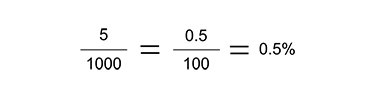
Why a promotion costs more than your last one
Sprizzy buys through the Google Ads auction, and the price moves.
View rate is the biggest lever. When more people choose to watch your ad, your budget goes further. A thumbnail that does not stand out, or keywords that do not match your video, pushes it the other way.
Targeting. High demand countries, narrow audiences and high value interests all cost more than broader, lower demand targeting.
Timing. Around big holidays and major events, more advertisers are bidding for the same attention.
Different settings. If you duplicated a promotion, check the ad types, placements, countries and goal against the original. Small differences change the outcome.
The same video again. A repeat promotion of one video reaches people at a different time, and the viewers who subscribed the first time already have. See Why did a second promotion of the same video do differently from the first?.
My views came from countries I did not choose
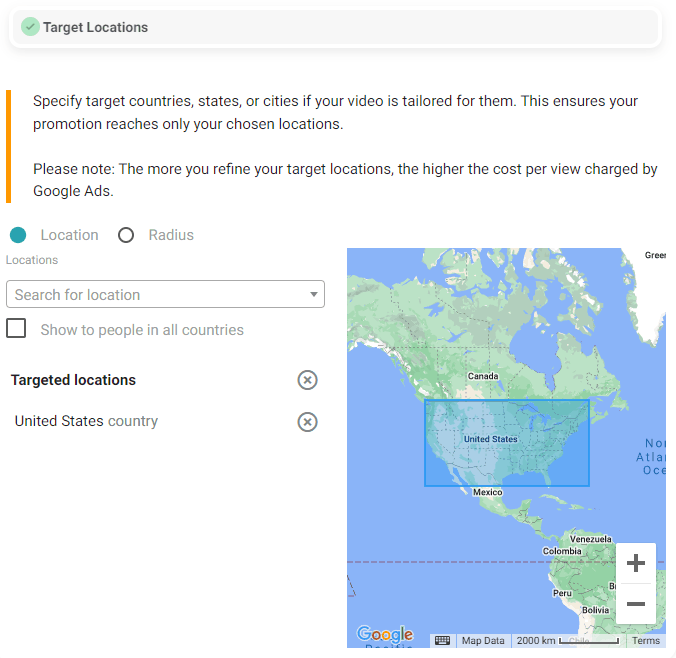
If the promotion targets all countries, Google serves your ad where it performs best for the money, which is often not the markets you had in mind.
You can pick countries yourself under Edit Campaign, then Targeting, then Target Locations. Narrower targeting usually means fewer views for the same budget, so decide which matters more to you.
What to change
- Replace broad keywords with phrases that match your video exactly.
- Add the channels and videos your audience already watches as placements.
- Test a new thumbnail. It is your ad in the in-feed, search and Shorts placements.
- Turn on more than one ad type so the system has room to find what works.
- Give any change a day before judging it.
About money
Money you have not spent is always yours. You can end the promotion and refund it or use it on another video.
Money already spent on delivered ad views is not usually returned. If it was your first promotion, it may be covered by our money-back guarantee. When a first promotion runs to the end and the results come in below the estimate on our pricing page, we refund what you paid for it, up to $100. Email support@sprizzy.com within 14 days after it ends. For any other finished promotion that delivered far less than the estimate you were shown, email support@sprizzy.com with the campaign ID and we will review it. See our refund policy.
What to do next
Open the Ad Groups tab, note the audiences that delivered nothing, and rebuild your targeting around the ones that did.
Where Do Sprizzy Views Come From? Choosing Your Countries
Read the video transcript
Sprizzy shows your ad in the countries you choose. If you leave it on all countries, Google Ads shows it wherever it performs best.
Every view comes from a real YouTube ad. Your video shows next to similar videos, before other videos, at the top of search results and in the Shorts feed.
Sprizzy views from other countries mean your promotion runs worldwide. That's the widest reach for your budget, and it's a choice you can change.
The ad puts your video in front of people likely to enjoy it. Sprizzy tests more than 200 audiences and moves your budget to the ones that work.
Sprizzy lets you pick your countries, and you can go narrower: states, cities, zip codes, or a radius around one place.
Choose them in the builder, or change them later under Targeting, then Target Locations. Narrower targeting usually means fewer views for the same budget, so you decide what matters more.
Sprizzy targeting goes beyond places. You can choose the keywords people search, the language they speak, the channels and videos they already watch, and their gender and age.
You can also pick where on YouTube your ad plays, under Select Your Ad Types. Leave them all on, and the system decides where your budget works best.
With Sprizzy, your report shows who watched, by country and by placement. In YouTube Studio, the views from your ad are listed as YouTube advertising, and each one is a real person who chose to watch.
Get the full answer at sprizzy.com. Next up: are Sprizzy views real?