Paying to promote a YouTube video used to mean a Google Ads account you had to learn, or a stranger on a gig site selling “views”. In 2026 it is cleaner. YouTube has its own Promote tab inside Studio, Google Ads defines to the second what a paid view is, and YouTube’s help pages state plainly that promoted views and subscribers are legitimate. This article covers what $50 buys, when paying is worth it, what decides the result, and how to run a first test that tells you something.
What does paying to promote a YouTube video actually mean?
It means your video runs as an ad on YouTube through Google Ads, and you pay only when a real person chooses to watch it. That is the only kind of paid promotion YouTube supports. YouTube’s Promote help page settles the legitimacy question in one line: “all views and subscribers you gain through a Promote campaign are legitimate.” Anything that adds views without a viewer is a different product, and YouTube bans it.
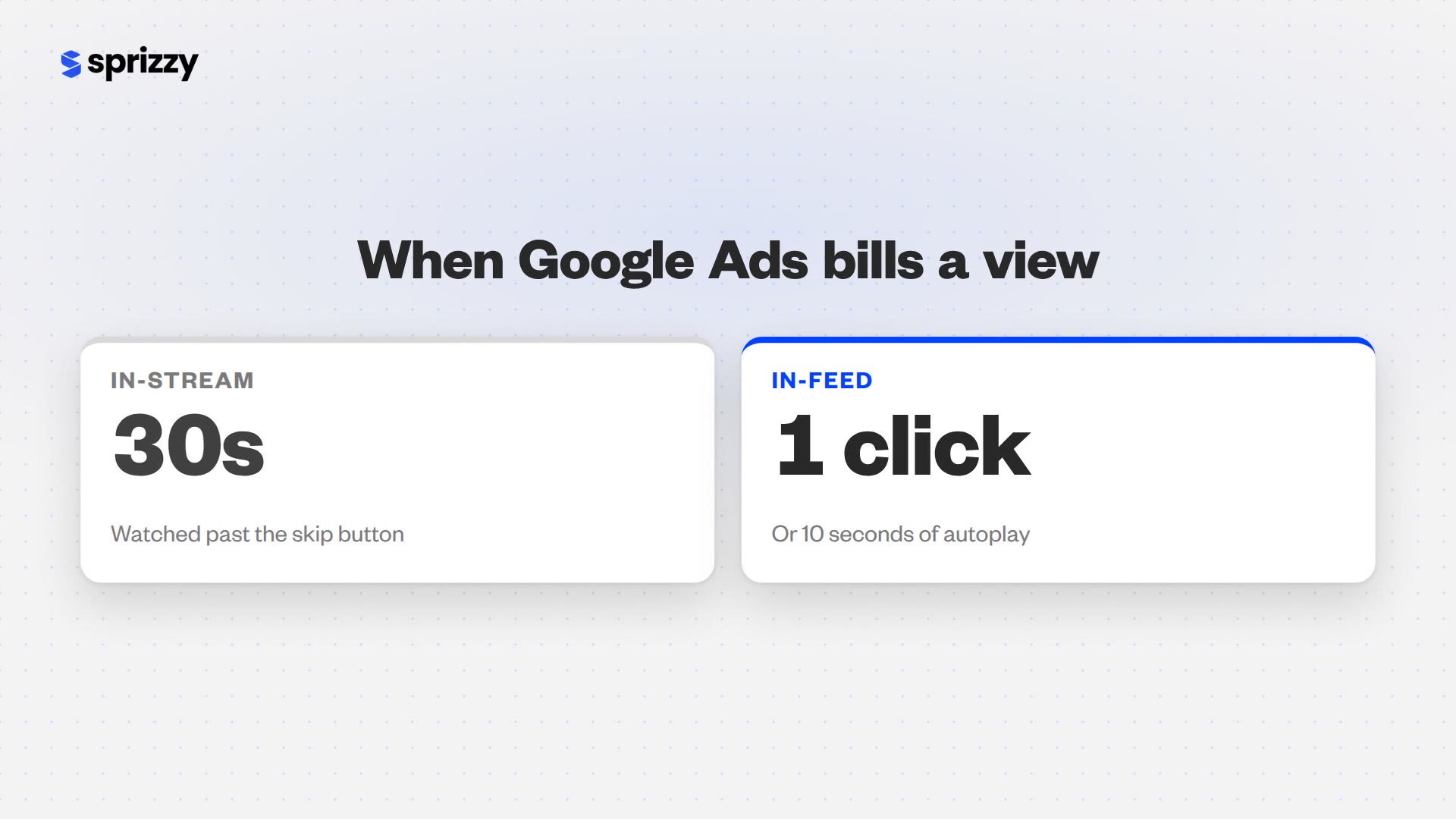
There are three places your promoted video can appear, and Google Ads charges for each differently. The definitions below are verbatim from the Google Ads cost-per-view definition, as of September 2026.
| Ad format | Where it shows | When you pay for a view |
|---|---|---|
| In-feed | Search results, the home feed, next to related videos | When a person clicks the thumbnail to watch, or watches the autoplay for at least 10 seconds |
| Skippable in-stream | Before or during another video, skippable after 5 seconds | When a viewer watches 30 seconds (or the whole ad if shorter) or interacts with it |
| Shorts | In the Shorts feed | When someone watches 10 seconds (or the whole ad if shorter) or taps the call to action |
Those thresholds answer half of the “is it worth it” question on their own. An in-stream viewer had a skip button for 25 seconds and did not press it. An in-feed viewer saw your thumbnail next to organic results and picked yours. You are paying for a person who chose to watch, which is the same material organic growth is made of.
Google’s best-practice guide for Video view campaigns adds that running all three formats together “can help drive additional TrueView views, consideration lift, and increased Search lift,” which is why most creator promotions run across formats rather than picking one.
What does $50 actually buy?
A few hundred to a couple of thousand chosen views, depending on niche, country and the video. Benchmarks put a skippable in-stream view near $0.05 and a Shorts view at $0.10 to $0.30 (Store Growers, February 2026); a broader estimate covering crowded commercial niches runs $0.10 to $0.30 per view (WebFX, April 2026). Creator promotions targeted at keywords and channels in quieter niches run well below that advertiser average.
Two other numbers set expectations. Store Growers’ 2026 benchmark puts the average view rate, the share of people shown a skippable ad who watch it, at 31.9%, and the cost per thousand impressions at $5 to $10 for most advertisers. So $50 is also several thousand impressions of your thumbnail and title in front of people who match your targeting, and roughly a third of them stop to watch.
Where in that range you land is mostly under your control:
- Country. A view in the United States costs more than a view in most other countries, because more advertisers are bidding for that viewer.
- Niche. A finance or software video competes with brands paying for leads. A cooking, gaming or hobby video mostly competes with other creators.
- The video itself. A hook that holds people past the skip point earns a higher view rate, and Google’s auction rewards ads people watch with a lower price per view.
- Targeting. Narrow keyword, channel and location targeting reaches people who are already interested, and interested people cost less per view than everyone.
When is paying to promote a YouTube video worth it?
It is worth it when the video is good and the audience is small. Promotion solves one problem, that nobody has seen the video yet, and solves it fast. Tim Schmoyer of Video Creators put the test simply: “If you have videos that are working, that are taking non-subscribed viewers and successfully converting them into subscribers… some of those videos might be worth promoting.”
The situations where promotion pays off most clearly:
- You have a video that already converts. Look in YouTube Studio for the video with the best subscribers-per-view and the strongest retention. That video is proven; it only needs reach.
- A new channel needs its first real audience. Search and suggested traffic start slowly on a channel nobody has watched. A promotion gives YouTube’s recommendation system real viewers, real watch time and real reactions to learn from on day one.
- The video is time-sensitive. A launch, an event, a seasonal guide or a trending topic cannot wait months for search to catch up.
- The video sells something. A product review, a course, a service or a music release turns views into revenue, so each view is worth far more than the ad revenue on it. This is where businesses using YouTube see the fastest return.
- You are stuck under a plateau. A channel that posts consistently and still cannot get past a few hundred views per video has a discovery problem, not a content problem. Promotion is the direct fix for discovery.
The return on a promotion is the audience it builds: a thousand new people who now know your channel exists, and the subscribers, watch time and sales that follow from them.
What decides whether the money works?
The video decides. Same budget, same targeting, same week, and one video will bring in dozens of subscribers while another brings in a handful. That is the most consistent pattern in paid promotion, and it is good news, because it puts the outcome in your hands before you spend a dollar. Pick the right video and the right goal and the rest of the campaign is mechanics.
A public example makes the point. UK tech channel Speak to the Geek published a five-video promotion test in February 2026, most runs lasting three days on a small budget. One video set to the audience-growth goal brought in 30 new subscribers from a £10 budget. Another video with the same budget and goal brought in two. Channel, targeting and budget were identical; the difference was the video. Promote the one that already earns subscribers organically and you are stacking the odds.
Three things to check on the video before you promote it:
- The first 30 seconds. An in-stream view is billed at 30 seconds, and an in-feed view starts with the thumbnail. If the opening does not state what the viewer gets and why now, fix it first. Our guide to scripting a video that keeps people watching covers the hook patterns that hold past the skip button.
- The subscribe reason. A promoted viewer is new. Somewhere in the video, tell them what the channel is and why they would want the next one.
- The goal. YouTube’s Promote tool lets you choose more subscribers, more views, or website clicks. Pick one. A video promoted for views is optimised toward cheap watches; a video promoted for subscribers is optimised toward people who take the second action.
Do promoted views help the channel afterwards?
Yes, because the promoted viewer is a real person who now knows your channel, and everything they do next is organic. YouTube says so directly: “Follow-on Views are organic views you get when someone watches your videos after seeing your promoted content,” and the same page confirms that follow-on views “count toward YPP eligibility.” Ads find the audience; the video keeps them, and the keeping is what YouTube measures.
This is also the answer to the older fear that promotion damages a channel. The fear came from bot views, which tank retention because nobody is watching. Ad views are the opposite: a person who kept watching past the skip point is a retention-positive viewer, and their session shows up in the same Studio reports as everyone else’s. We unpack the experiment behind that myth, and what YouTube actually says, in Do YouTube Ads Hurt Your Channel’s Organic Growth?
In YouTube Studio, promoted views appear under Traffic source as “YouTube advertising”, so you can compare them against search and suggested on the same chart: average view duration, subscribers gained, and what those viewers watched next. That comparison is the real report card for a promotion, and it is free the day the campaign ends.
Promote button, Google Ads, or a promotion service: which should you pay?
All three buy the same ads on the same platform; they differ in how much work you do and how much of the machine you can see. The Promote tab in Studio is the simplest: choose a video, a goal, a location and a budget. Google Ads is the same auction with every lever exposed. A promotion service runs Google Ads for you, including the audience building and pruning that decides the cost per view.
The trade-off is control against time. Promote hides the levers that matter most for cost, which are the audience lists and the placements. Google Ads shows them all and expects you to learn them. A service is for the creator who wants the Google Ads result without the Google Ads afternoon. If you’d rather not manage Google Ads yourself, a service like Sprizzy can run YouTube ad campaigns for you starting at $50, with real viewers only, no bots. Its pricing page estimates 1,000 to 2,500 views for a $50 campaign, it builds and tests 200+ audience combinations of keywords, target channels and demographics for each video, dropping underperformers every hour, and a first campaign comes with a money-back guarantee.
The side-by-side of all three routes lives in the business promotion guide linked above, so it is not repeated here.
How do you run a $50 test that tells you something?
Pick one proven video, one goal, a tight audience and a three-to-five-day run, then read the Studio report a week later. A test built this way answers the only question that matters: what does a chosen viewer of this video cost, and does that viewer stay. Spread the same $50 across four videos and three goals and you learn nothing from any of them.
- Choose the video with the best organic conversion. In Studio, sort your videos by subscribers gained per view. Promote the winner, not the newest upload.
- Set one goal. Subscribers if you are building a channel, views if you are launching something, website clicks if the video sells.
- Target narrowly. Two or three countries at most, a handful of keywords that describe the video, and a few channels whose audience is your audience.
- Run three to five days. Long enough for the auction to settle, short enough that you are not funding a mistake for a month.
- Read three numbers. Average view duration from the “YouTube advertising” traffic source, subscribers gained from it, and what those viewers watched next. If retention from ads is close to your organic retention, the audience was right. If subscribers came in, the video was right.
- Scale what worked. A second run on the same video with the winning countries and keywords will be cheaper per view than the first, because you are no longer paying to find out.
What should you never pay for?
Never pay for views that do not come from an ad platform. YouTube’s fake engagement policy “doesn’t allow anything that artificially increases the number of views, likes, comments, or other metrics either by using automatic systems or serving up videos to unsuspecting viewers,” and bans promoting “third-party services that artificially inflate metrics like views, likes, and subscribers.” A gig promising a fixed number of views for a fixed price sells exactly that.
The tells are easy once you know them. Real ad promotion never guarantees a count, because an auction sets the price and a viewer decides whether to watch, and it never promises likes or comments. It shows up in your Studio analytics under “YouTube advertising”, with retention and a country breakdown, because the views are real sessions. If a seller guarantees a number, delivers overnight, and the views arrive with no traffic source you recognise, you have bought bots, and the fake engagement policy puts the channel at risk for it. If the goal is reaching monetization, that risk is the opposite of progress.
Common questions
How much does it cost to promote a YouTube video?
You set the budget, and you pay per view rather than per campaign. Third-party 2026 benchmarks put a skippable in-stream view at roughly $0.05 and a Shorts view at $0.10 to $0.30, with crowded commercial niches costing more. YouTube's own Promote tab and Google Ads have no fixed minimum, and managed services such as Sprizzy start at $50. Country, niche and the video's own hook decide where you land.
Are YouTube promotion views real?
Views bought as ads through Google Ads or YouTube's Promote tab are real people who chose to watch. Google only bills an in-stream view after 30 seconds, or an in-feed view after a click or 10 seconds of autoplay, and YouTube's Promote help page states that all views and subscribers gained through a Promote campaign are legitimate. Views sold as a fixed count by a third party are not; YouTube's fake engagement policy bans them.
Does paying to promote a video get you subscribers?
Yes, when you choose the subscriber goal and promote a video that already converts. YouTube's Promote tool lets you optimise for more subscribers, more views, or website clicks, and the subscriber goal steers the ads toward people who take the second action. In a February 2026 creator test, one £10 audience-growth promotion produced 30 subscribers. The video's own subscribe pitch and retention decide how many you get.
Do promoted views count toward YouTube monetization?
The organic views that follow a promotion do. YouTube calls these follow-on views, defined as viewers watching your videos after seeing your promoted content, and states they count toward Partner Program eligibility. The ad views themselves sit in a separate column, so a promotion earns its way toward monetization through the viewers it brings back rather than the ad plays. Our monetization requirements guide has the full accounting.
How long should a YouTube promotion run?
Three to five days for a first test, which is long enough for the ad auction to settle on a price and short enough that a wrong audience does not cost you a month. Once a test shows good retention and subscribers from the YouTube advertising traffic source, a longer second run on the same video with the winning targeting is where the cheap views come from.
Can you promote a YouTube Short with ads?
Yes. Shorts ads are one of the three formats in Google Ads Video view campaigns, alongside in-feed and skippable in-stream, and they appear inside the Shorts feed. Google bills a Shorts view when someone watches 10 seconds, or the whole Short if it is shorter, or taps the call to action. Store Growers' February 2026 benchmark puts Shorts views at $0.10 to $0.30 each, higher than in-stream, because the feed is more competitive.
Is it against YouTube's rules to pay for views?
No, when the views come from ads. YouTube runs the Promote tab itself and Google Ads is its own ad platform, so paying for ad views is the sanctioned route and the resulting views and subscribers are legitimate. What the fake engagement policy bans is anything that artificially inflates views, likes, comments or subscribers, including third-party services that sell a guaranteed count. The difference is whether a real person chose to watch.